


“Most WordPress breaches are not exotic zero-days. They are predictable: unpatched plugins, weak logins, injectable themes, and missing basic hardening”. Here’s how to protect your site from the most common attacks.
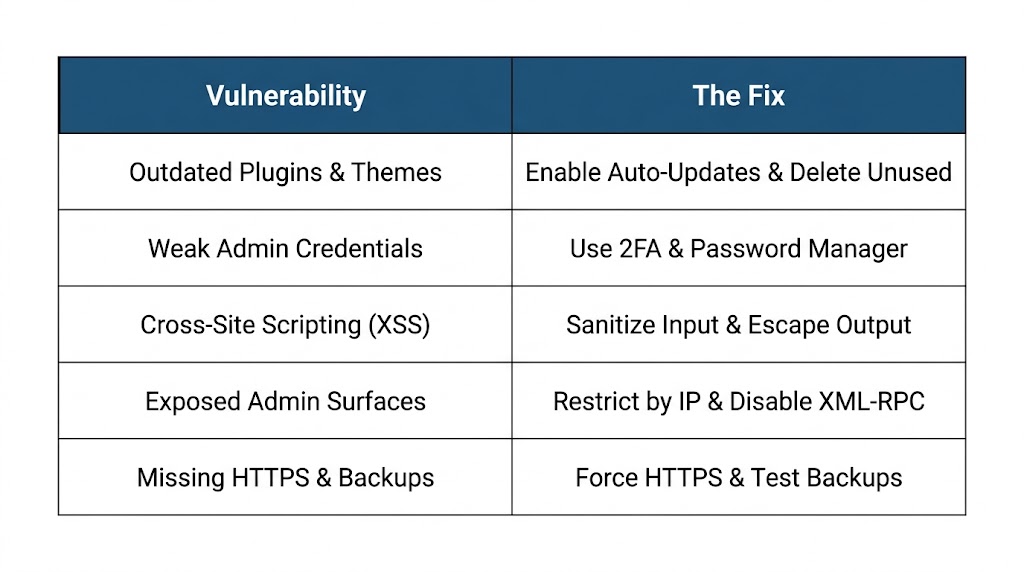
🚨 1. Outdated Plugins and Themes
“Plugin CVEs are the #1 WordPress story year after year. Delete unused plugins, update the rest on a schedule, and prefer maintained vendors”.
Why It’s Dangerous:
Hackers scan for known vulnerabilities in specific versions of plugins. If your plugin is outdated by even one version, you may be vulnerable to attacks that were discovered months ago.
The Fix:
- Enable Automatic Updates: WordPress supports automatic updates for plugins and themes.
- Schedule Manual Reviews: Even with auto-updates, review major updates.
- Delete Unused Plugins: “Delete and completely remove unused themes and plugins”.
- Use a Vulnerability Scanner: Tools like WPScan can flag known vulnerable versions.
WordPress Security Task:
// Add to wp-config.php to enable automatic updates
define('WP_AUTO_UPDATE_CORE', true);Code language: JavaScript (javascript)
🔑 2. Weak or Reused Admin Credentials
“Use unique passwords and a password manager for wp-admin users. Enable 2FA on administrator accounts. Limit login attempts”.
Why It’s Dangerous:
Hackers use stolen credential lists from other breaches. If you reuse passwords, one breach compromises all your accounts.
The Fix:
- Use a Password Manager (1Password, Bitwarden, LastPass)
- Enable Two-Factor Authentication (2FA) for all admin accounts
- Limit Login Attempts—block IPs after failed attempts
- Use Passwordless Logins for privileged users
2FA Implementation:
// Using a plugin like iThemes Security
// Enable 2FA for all admin users
add_action('admin_init', function() {
    if (current_user_can('manage_options') && !wp_verify_nonce($_SESSION['2fa_nonce'], '2fa_verified')) {
        wp_redirect(add_query_arg('2fa_required', '1', wp_login_url()));
        exit;
    }
});Code language: PHP (php)
🌐 3. Cross-Site Scripting (XSS)
“Stored or reflected XSS lets attackers run script in a visitor’s browser—often via a vulnerable form, comment field, or admin-facing plugin page”.
Why It’s Dangerous:
Attackers can steal session cookies, redirect visitors, or deface your site.
The Fix:
- Keep components updated
- Add a Content-Security-Policy as defense in depth
- Validate and sanitize all input from forms and comments
- Escape all outputs with
esc_html(),esc_attr(), etc.
CSP Implementation:
// Add Content-Security-Policy headers
function add_csp_header() {
    header("Content-Security-Policy: default-src 'self'; script-src 'self' 'unsafe-inline' https://cdn.example.com; style-src 'self' 'unsafe-inline'; img-src 'self' https://cdn.example.com;");
}
add_action('send_headers', 'add_csp_header');Code language: JavaScript (javascript)
🔓 4. Exposed Admin and Debug Surfaces
“wp-admin, xmlrpc.php, and leftover staging sites widen the attack surface. Restrict admin by IP when possible, disable XML-RPC if unused, and never leave debug mode on in production”.
Why It’s Dangerous:
Every exposed endpoint is a potential entry point for hackers.
The Fix:
1. Restrict Admin Access by IP (when possible):
# In .htaccess
<Directory /wp-admin>
    Require ip 123.456.789.0  # Your office IP
    Require ip 987.654.321.0  # Your home IP
</Directory>Code language: PHP (php)
2. Disable XML-RPC if not using it:
add_filter('xmlrpc_enabled', '__return_false');Code language: JavaScript (javascript)3. Never Leave Debug Mode On in Production:
// In wp-config.php (only for development)
define('WP_DEBUG', false);
define('WP_DEBUG_LOG', false);Code language: JavaScript (javascript)
4. Remove Staging Sites after launch—they often have weak security.
💾 5. Missing HTTPS, Headers, and Backup Hygiene
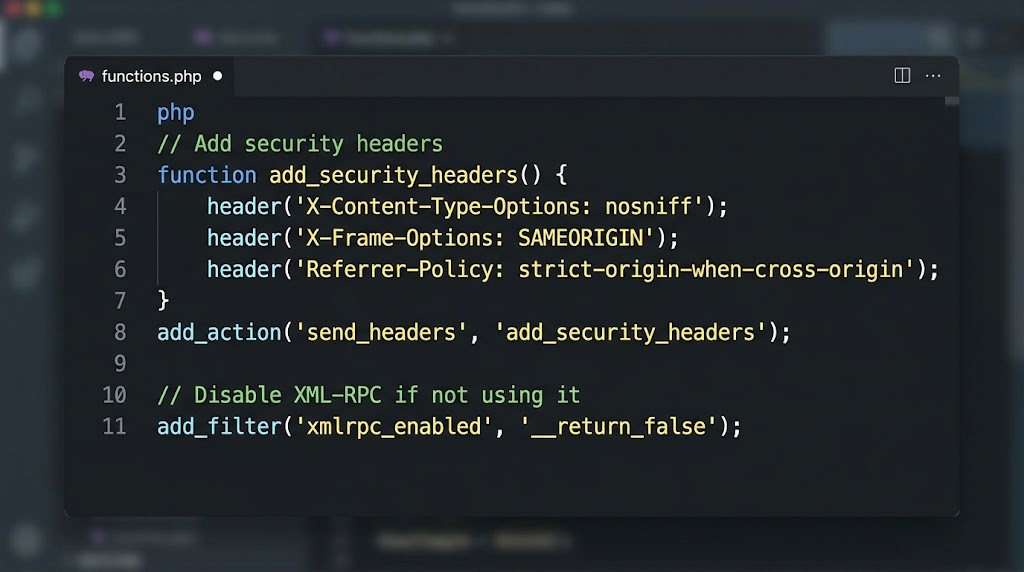
“Force HTTPS with a valid certificate and HSTS when ready. Add security headers (CSP, X-Content-Type-Options, framing controls). Keep offline backups you have actually restored once”.
Why It’s Dangerous:
Without HTTPS, data in transit can be intercepted. Without backups, you can’t recover from an attack.
The Fix:
HTTPS Implementation:
# .htaccess redirect HTTP to HTTPS
RewriteEngine On
RewriteCond %{HTTPS} off
RewriteRule ^(.*)$ https://%{HTTP_HOST}/$1 [R=301,L]Code language: PHP (php)
Security Headers:
function add_security_headers() {
    header('X-Content-Type-Options: nosniff');
    header('X-Frame-Options: SAMEORIGIN');
    header('Referrer-Policy: strict-origin-when-cross-origin');
}
add_action('send_headers', 'add_security_headers');Code language: JavaScript (javascript)
Backup Hygiene:
“Keep offline backups you have actually restored once. Delete old locally-stored backups (these are backups stored on your own server)”.
🛡️ The Layered Security Model
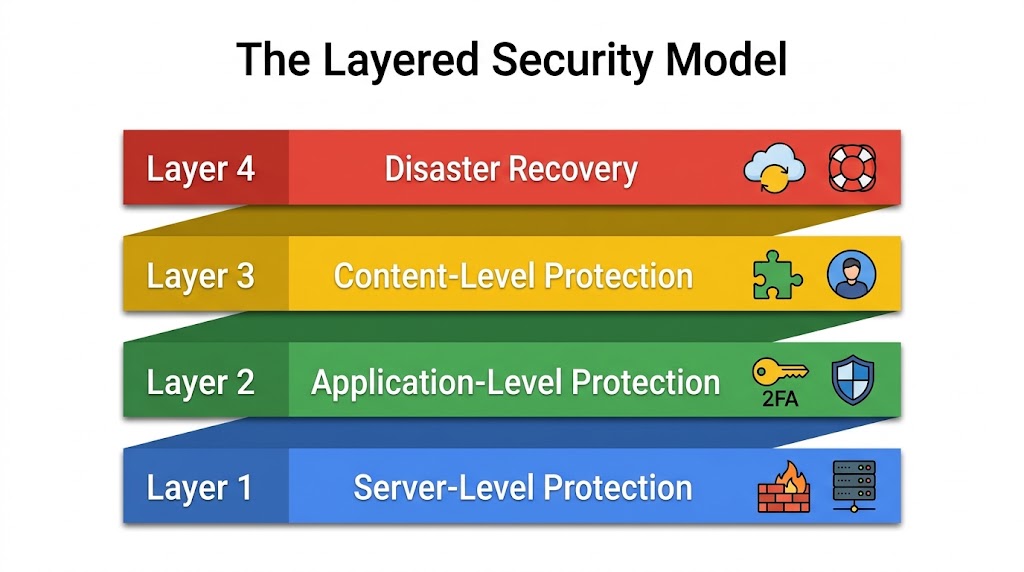
A visual representation of the four layers of WordPress security.
Recent Post

WP-CLI: 15 Commands Every WordPress Developer Should Know

10 Essential WordPress Design Plugins for a Modern.

From Figma to WordPress: A Designer’s Handoff Checklist

Accessibility in WordPress Design: Your Ethical and Legal.

