



The right tools can transform your WordPress SEO approach. Between plugin bloat, shifting Core Web Vitals thresholds and Google’s ever-evolving ranking systems, guessing is no longer an option. Here is our curated toolkit for 2026 — the exact stack we use on client sites, and how each piece slots into a repeatable monthly workflow.
Why Your WordPress SEO Toolkit Matters in 2026
WordPress powers a huge share of the web, which means competition for every keyword is steeper than ever. No single plugin will carry your rankings. What actually works is a layered stack: one tool for on-page optimisation, one for technical health, one for performance, one for analytics, and one for content quality.
“Install a plugin like Yoast SEO or Rank Math. These tools help with titles, sitemaps, robots.txt, and so much more.”
Treat that plugin as the foundation — not the whole house. Everything below builds on top of it.
Core SEO Plugins
Yoast SEO — Best for Beginners and All-Around SEO
- Content optimization analysis
- XML sitemaps
- Schema markup
- Social media integration
- Keyword and readability analysis
Rank Math — Best for Advanced Users Wanting More Features
- Multi-keyword optimization
- Built-in 404 monitor
- Integration with Google Search Console
- Advanced schema markup
- Redirection manager
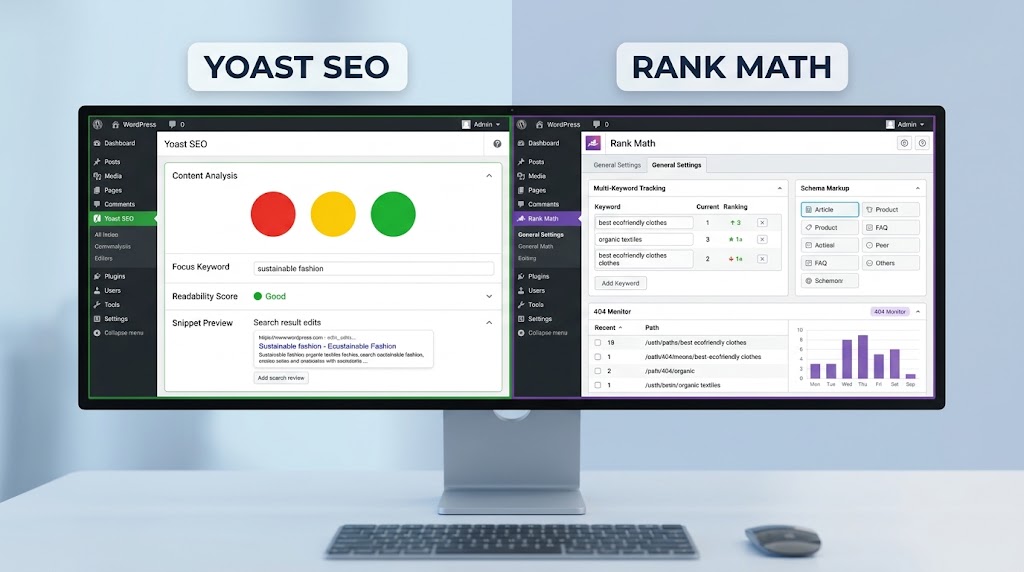
Side by side: Yoast SEO’s content analysis panel and Rank Math’s multi-keyword tracking.
Performance Tools
Google PageSpeed Insights
Purpose: Measure Core Web Vitals.
Why it matters: Performance is a ranking factor.
How to use it:
- Enter your URL
- Analyze
- Review recommendations
- Implement fixes
GTmetrix
Purpose: Detailed performance analysis.
- Page load time
- Page size
- Requests
- Waterfall chart of resources
Jetpack Boost
Purpose: Performance optimization from inside WordPress.
- CSS optimization
- Deferred JavaScript
- Image optimization
“Performance tuning includes optimizing images, using caching tools, reducing unused scripts, and other optimizations targeting Core Web Vitals.”
Analytics Tools
Google Analytics (GA4)
Purpose: Track traffic and behaviour.
- Traffic sources
- User behavior
- Conversion tracking
- Bounce rate
- Time on site
Google Search Console
Purpose: Monitor search performance.
- Search queries
- Click-through rates
- Index coverage
- Mobile usability
- Core Web Vitals
Content Tools
Hemingway App
Purpose: Improve readability.
“Headings (H1, H2, H3) are more than just bigger texts. They help break content into readable pieces and help search engines understand the structure.”
Grammarly
Purpose: Grammar and spelling check.
Ahrefs / SEMrush
Purpose: Keyword and competitor research.
- Finding keyword opportunities
- Tracking rankings
- Analyzing competitors
Link Building Tools
Broken Link Checker
Purpose: Find and fix broken links.
“Review content regularly, update information, links, and meta descriptions.”
Link Whisper
Purpose: AI-powered internal linking suggestions.
Sitemap and Technical SEO Tools
Yoast SEO Sitemap
Purpose: Create and update XML sitemaps.
- Enable the Yoast SEO XML sitemap
- Submit it to Google Search Console
- Keep it updated with new content
Screaming Frog SEO Spider
Purpose: Technical SEO audit.
- Meta tags
- Headers
- H1, H2, H3 structure
- Broken links
- Redirects
SEO Tool Comparison Table (2026)
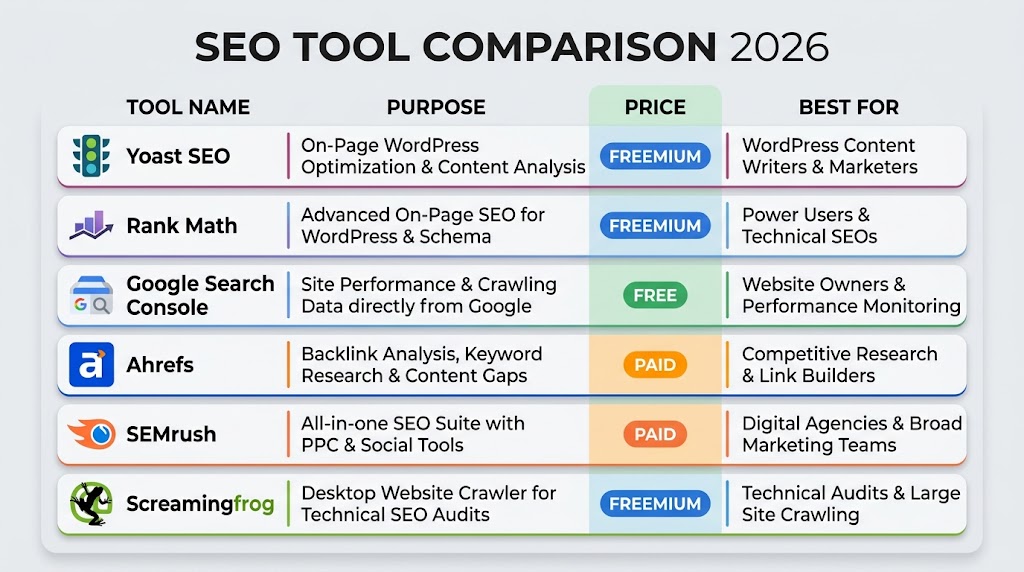
| Tool | Purpose | Price | Best For |
|---|---|---|---|
| Yoast SEO | All-around SEO | Free / Paid | Beginners |
| Rank Math | All-around SEO | Free / Paid | Advanced users |
| Google Search Console | Search performance | Free | Everyone |
| Google Analytics | Traffic analytics | Free | Everyone |
| PageSpeed Insights | Core Web Vitals | Free | Everyone |
| GTmetrix | Performance audit | Free / Paid | Performance enthusiasts |
| Ahrefs | Keyword research | Paid | Advanced SEOs |
| SEMrush | Competitor analysis | Paid | Advanced SEOs |
| Screaming Frog | Technical audit | Free / Paid | Technical SEOs |
| Jetpack Boost | On-site optimization | Free / Paid | WordPress users |
Your Monthly SEO Workflow
A toolkit only pays off when it runs on a schedule. Here is the 10-step monthly loop we follow — audit, review, update, monitor, plan.
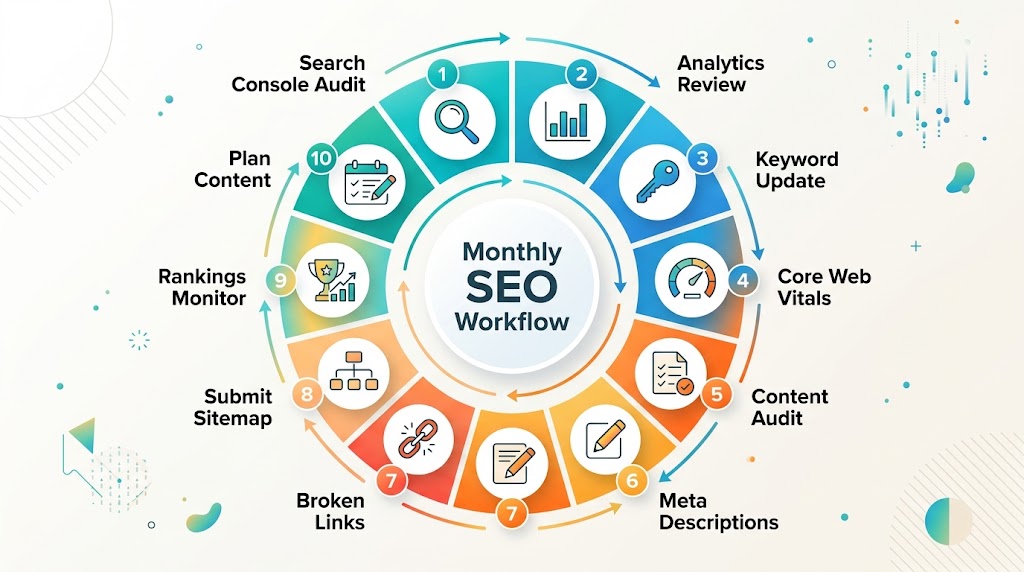
The Monthly SEO Workflow: a repeating 10-step cycle that keeps rankings, content and technical health moving forward.
- Google Search Console: Check for coverage issues
- Google Analytics: Review traffic trends
- Yoast / Rank Math: Update focus keywords
- PageSpeed Insights: Monitor Core Web Vitals
- Content Audit: Review top-performing pages
- Update: Meta descriptions and internal links
- Audit: Broken links with Broken Link Checker
- Submit: Updated sitemap to Google Search Console
- Monitor: Rankings for target keywords
- Plan: Content for next month
Final Thoughts
You do not need every tool on this list on day one. Start with a solid on-page plugin (Yoast SEO or Rank Math), connect Google Search Console and Analytics, and add a performance tool so Core Web Vitals never become an afterthought. Then, once a month, run the workflow above.
That combination — the right stack plus a consistent routine — is what separates WordPress sites that drift down the rankings from the ones that quietly climb.
Need help implementing this stack on your own WordPress site? Get in touch with the Cyber Mickey team.
Recent Post

WP-CLI: 15 Commands Every WordPress Developer Should Know

10 Essential WordPress Design Plugins for a Modern.

From Figma to WordPress: A Designer’s Handoff Checklist

Accessibility in WordPress Design: Your Ethical and Legal.

