

WP-CLI is the WordPress developer’s secret weapon—a command-line interface that can handle routine tasks in seconds rather than minutes. If you’re still doing everything through the admin panel, you’re working too slow.
🚀 Getting Started with WP-CLI
WP-CLI is the official command-line tool for WordPress management. It’s installed on most managed WordPress hosts or can be installed on any server.
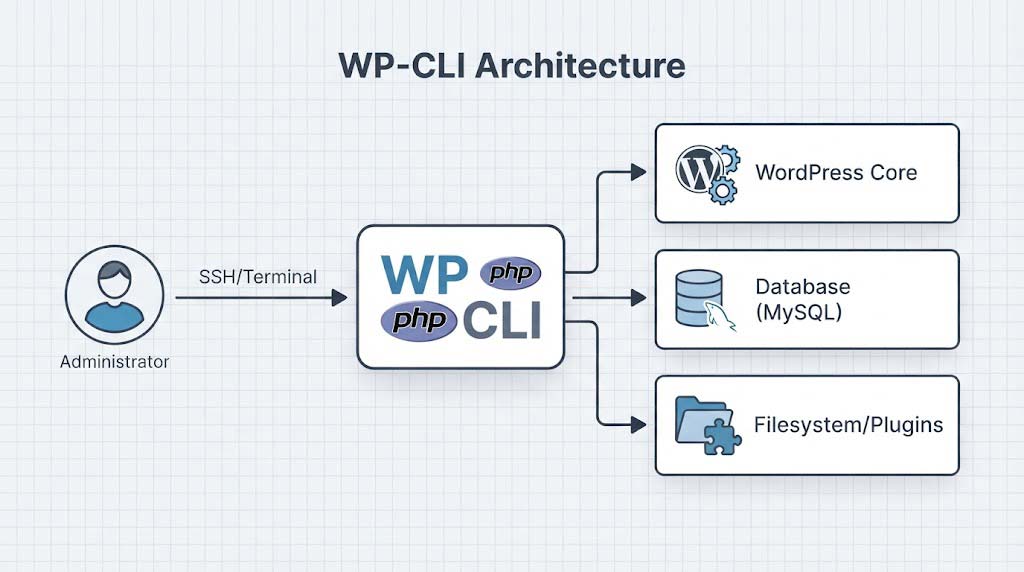
Figure 1: WP-CLI Architecture showing Administrator accessing Core, Database, and Filesystem via SSH/Terminal.
Installation:
# Download WP-CLI
curl -O https://raw.githubusercontent.com/wp-cli/builds/gh-pages/phar/wp-cli.phar

# Make it executable
chmod +x wp-cli.phar

# Move to system path
sudo mv wp-cli.phar /usr/local/bin/wp

# Test installation
wp --infoCode language: PHP (php)
📋 WP-CLI Quick Reference
Before diving into the full list, here is a quick reference table for the most common tasks you will perform.
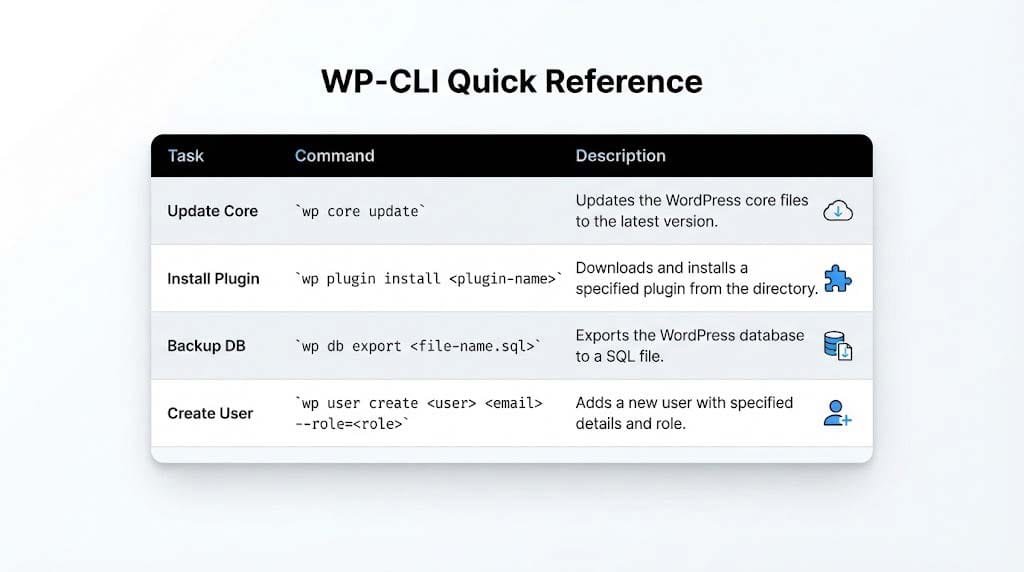
Figure 2: WP-CLI Quick Reference Table highlighting core, plugin, DB, and user commands.
📋 Essential WP-CLI Commands
1. Core Updates
Update WordPress Core
# Check for updates
wp core check-update

# Update WordPress core
wp core update

# Update to a specific version
wp core update --version=6.4.0

# Download WordPress without installing
wp core download --locale=en_USCode language: PHP (php)
2. Plugin Management
Manage Plugins from the Command Line
# List all plugins
wp plugin list

# Install a plugin
wp plugin install wordfence --activate

# Update all plugins
wp plugin update --all

# Deactivate a plugin
wp plugin deactivate plugin-name

# Delete unused plugin
wp plugin delete plugin-nameCode language: PHP (php)
3. Theme Management
Manage Themes Efficiently
# List themes
wp theme list

# Install and activate a theme
wp theme install twentytwentyfour --activate

# Update themes
wp theme update --all

# Delete a theme (can't delete active theme)
wp theme delete unused-themeCode language: PHP (php)
4. User Management
Manage Users from the CLI
# Create a new admin user
wp user create username email@domain.com --role=administrator --user_pass=securepassword

# List all users
wp user list

# Delete a user
wp user delete 123 --reassign=456

# Update a user password
wp user update username --user_pass=newpasswordCode language: PHP (php)
5. Database Operations
Database Management
# Export database
wp db export backup.sql

# Import database
wp db import backup.sql

# Search and replace across the database
wp search-replace 'oldsite.com' 'newsite.com'

# Optimize database tables
wp db optimize

# Repair damaged tables
wp db repairCode language: PHP (php)
6. Media Management
Handle Images and Media
# Regenerate thumbnails
wp media regenerate --yes

# Import images from a directory
wp media import /path/to/images/*.jpg

# List all media files
wp media listCode language: PHP (php)
7. Site Options
Manage WordPress Settings
# List all site options
wp option list

# Get a specific option
wp option get siteurl

# Update an option
wp option update siteurl 'https://newsite.com'

# Delete an option
wp option delete option_nameCode language: PHP (php)
8. Cron Jobs
Manage WordPress Cron
# List scheduled events
wp cron event list

# Run all due cron events
wp cron event run --due-now

# Schedule a specific event
wp cron event schedule wp_scheduled_deleteCode language: PHP (php)
9. Cache Management
Clear WordPress Caches
# Clear object cache
wp cache flush

# Clear transients
wp transient delete --all

# Rebuild permalinks
wp rewrite flushCode language: PHP (php)
10. Site Health Checks
Check Site Health
# Check for updates
wp core check-update
wp plugin update --dry-run
wp theme update --dry-run

# Check site health
wp site-health check --allCode language: PHP (php)
11. Posts and Content
Manage Content
# Create a new post
wp post create --post_title="New Post" --post_content="Content here" --post_status=publish

# List posts
wp post list --posts_per_page=10

# Delete posts in bulk
wp post delete $(wp post list --post_type=page --format=ids) --force

# Generate test content
wp post generate --count=50 --post_type=postCode language: PHP (php)
12. Admin Panel Navigation
Quick Admin Access
# Generate a one-time login link
wp user one-time-login admin

# Get the admin URL
wp eval 'echo admin_url();'Code language: PHP (php)
13. Multisite Commands
Manage WordPress Multisite
# Create a new site
wp site create --slug=newsite --title="New Site"

# List all sites
wp site list

# Delete a site
wp site delete 123Code language: PHP (php)
14. Backup and Migration
Site Migration Prep
# Export entire site for migration
wp export --post_type=post,page --all

# Set up a migration profile (using plugins)
wp migrate --setupCode language: PHP (php)
15. Developer Tools
Development Utilities
# Generate a new theme
wp scaffold theme my-theme

# Generate a new plugin
wp scaffold plugin my-plugin

# Generate unit tests for a plugin
wp scaffold plugin-tests my-plugin

# Scrape a URL to seed content
wp scaffold post --url=http://oldsite.com/new-pageCode language: PHP (php)
🖥️ See It In Action
Here is what a typical WP-CLI session looks like when updating plugins and exporting the database:
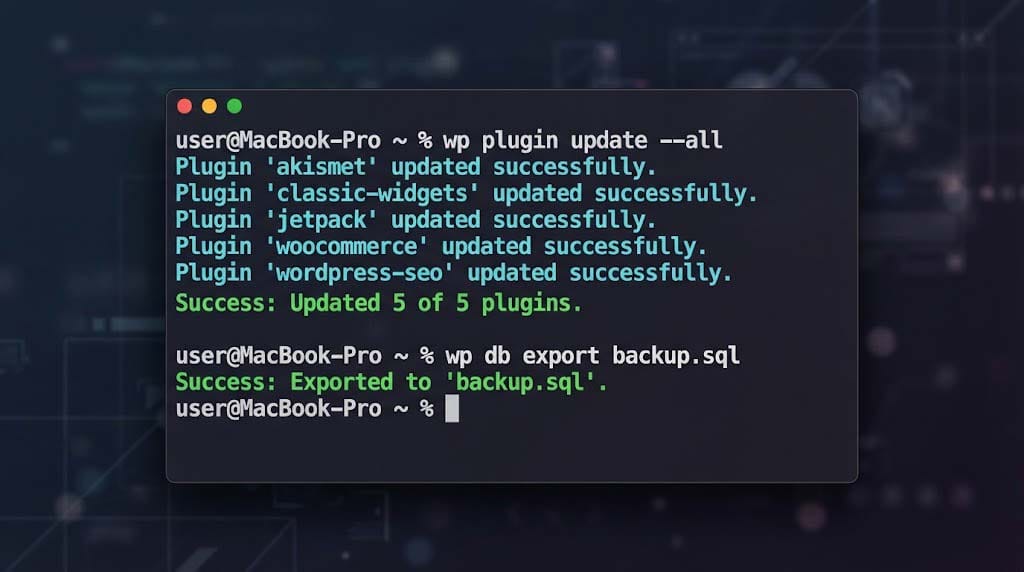
Figure 3: Terminal output showing successful plugin updates and database export.
🛠️ WP-CLI Automation Scripts
Daily Maintenance Script:
#!/bin/bash
# daily-maintenance.sh

# Update core
wp core update

# Update plugins
wp plugin update --all

# Update themes
wp theme update --all

# Optimize database
wp db optimize

# Clear cache
wp cache flush

# Log completion
echo "Maintenance completed: $(date)" >> maintenance.logCode language: PHP (php)
Site Migration Script:
#!/bin/bash
# migrate-site.sh

# Set variables
OLD_URL="http://oldsite.com"
NEW_URL="http://newsite.com"

# Export database
wp db export migration-db.sql

# Replace URLs
wp search-replace "$OLD_URL" "$NEW_URL" --precise

# Update permalinks
wp rewrite flush

# Clear caches
wp cache flush

echo "Migration complete! Check the site."Code language: PHP (php)
📊 WP-CLI vs Admin Panel Efficiency
The time savings are undeniable. Here is a breakdown of how much faster WP-CLI is compared to the traditional admin panel.
| Task | Admin Panel Time | WP-CLI Time | Efficiency Gain |
|---|---|---|---|
| Update all plugins | 5-10 minutes | 3 seconds | 100x faster |
| Create 50 test posts | 30 minutes | 2 seconds | 900x faster |
| Search-replace URLs | 15 minutes | 5 seconds | 180x faster |
| Export database | 5 minutes | 2 seconds | 150x faster |
| Create admin user | 3 minutes | 2 seconds | 90x faster |
By integrating WP-CLI into your workflow, you free up valuable time to focus on what really matters: building and designing great WordPress websites.
Recent Post

WP-CLI: 15 Commands Every WordPress Developer Should Know

10 Essential WordPress Design Plugins for a Modern.

From Figma to WordPress: A Designer’s Handoff Checklist

Accessibility in WordPress Design: Your Ethical and Legal.